Launchpad: the strategic playbook
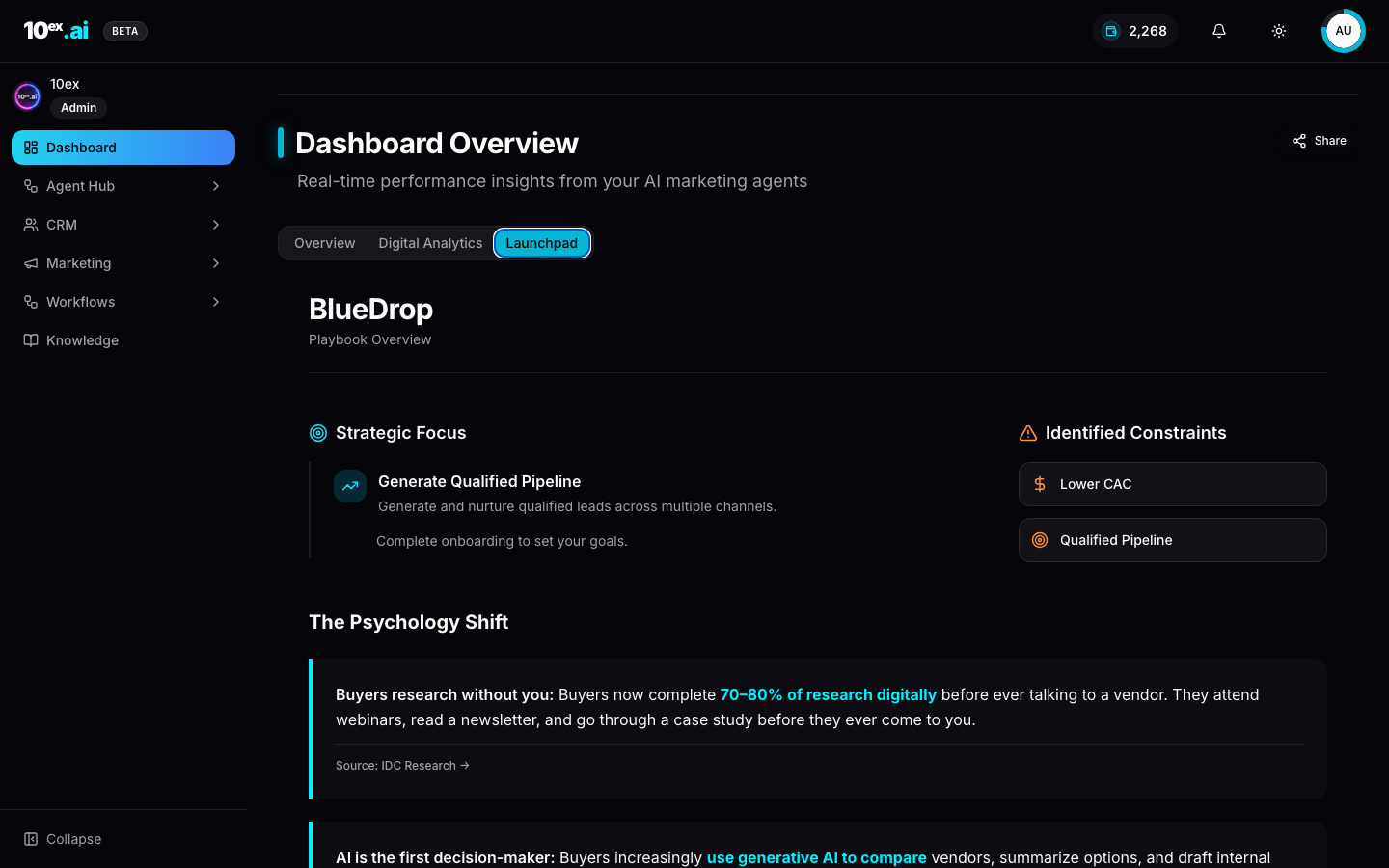
The Launchpad is the third tab on the Dashboard, sitting next to Overview and Digital Analytics. It isn’t a report. It’s the platform’s opinionated answer to “what should I do for the next 30 days?”, grounded in your brand knowledge, your connected channels, and your projected pipeline.
It exists because the hardest question for a new 10ex user isn’t “how do I run an agent.” It’s “which agent first, in what order, and to what end.”
What it gives you
A single scrollable page with five panels:
- Playbook Overview. Strategic focus (e.g. “Generate Qualified Pipeline”), identified constraints (Lower CAC, Qualified Pipeline), and the buyer psychology assumptions the plan is built on.
- Channels. Current monthly visits, distribution across Direct / Search / Social / Email, and a one-line health note (“Good channel diversity. Focus on optimizing top performers”).
- Discovery. Current ranking keywords, monthly clicks, and a calculated keyword expansion target (e.g. 2,072 more keywords could reach 2K+ more customers).
- Projected outcome. An explicit number (“30 Qualified Leads in 30 days”), a phase count, and an estimated pipeline value.
- 30-Day Execution Roadmap. A four-week, three-phase plan. Each step has an “Assigned To” field that points to a manual checklist item, a workflow, or a specific persona with a Hire button.
The three phases
| Phase | Weeks | Focus | Default agents |
|---|---|---|---|
| Phase 1: Discover | Week 1 | Foundation & Research | Juno (Market Research), Sora (Growth Audit), Marcus/Prospector |
| Phase 2: Define | Week 2 | Programming & Workflows | ICP Builder workflow, Maya (Ads Strategy Lab) |
| Phase 3: Deploy | Weeks 3–4 | Acquisition & Nurture | Zara/Ravi/Elena (Ads Managers), Nova (Email Sequence), Atlas (Webinar Host), Kai (Voice Lead Qualifier) |
The phasing is intentional: discovery before programming before deployment. Skipping ahead, for example by hiring Nova before Juno has confirmed the ICP, produces sequences against an unverified audience and burns credits.
The action plan
Below the roadmap, Launchpad lists 8–12 numbered steps, each tagged High Impact or Action Required. Two kinds of steps appear.
Manual (you do it):
- Step 1: Collect Knowledge Inputs. ICP, industries, regions, MQL rules, offer library, pricing, case studies, brand assets.
- Step 2: Connect Your Stack. Gmail/Outlook, Calendar, CRM, Ads Managers, GA4, website forms.
Agent or workflow (one click to hire):
- Step 3: Discover + Market Research + ICP Validation. Hires Juno (Market Research Crew).
- Step 4: Build Segments + Target Prospect List. Runs the ICP Builder workflow.
- Step 5: Program Agent Playbooks. Runs Maya (Ads Strategy Lab) as a background agent.
- Step 6: Launch Outbound Distribution. Hires Nova (Email Sequence) and Kai (Lead Qualifier).
- Step 7: Deploy Paid Campaign Structure. Hires Zara, Ravi, Elena depending on which ads connectors are enabled.
The “Hire” button on each step is the same one as on the Agent Store card. Clicking it adds the agent to Active Agents with the inputs Launchpad recommends pre-filled.
How the plan is generated
Launchpad isn’t a static template. It reads:
- Your full Brand Knowledge schema (company, ICP, USPs, segments; see Brand knowledge).
- Connected channels: Google Analytics, Search Console, ad accounts.
- Connected connectors. Only agents whose connectors you have are surfaced as recommendations.
It then projects an outcome (“30 qualified leads”) based on the channel mix, the ICP size, and benchmarks for the agents it sequences. The number is a forecast, not a guarantee, but it gives you a target to evaluate the plan against.
If your brand knowledge is incomplete, Launchpad surfaces “Complete onboarding to set your goals” instead of an outcome. Filling the 6-item checklist unblocks the projection.
When Launchpad regenerates
The plan refreshes whenever significant inputs change:
- A new connector is connected.
- Brand Knowledge is edited.
- A new agent is hired (the plan adapts to the new capability).
- You hit the manual Refresh button on the panel.
The plan is workspace-scoped, not user-scoped. Your whole team sees the same playbook, which is what you want when sales, marketing, and ops are aligning on next steps.
When Launchpad is the right tool
- Day 1 of a new workspace. Don’t pick an agent. Open Launchpad and follow it.
- After an ICP change. Sales tells you “we’re going up-market.” Edit Company Research, refresh Launchpad, follow the new sequence.
- Quarterly planning. The 30-day frame regenerates the plan. Treat it as the canonical input to a quarterly OKR review.
When it isn’t
- Single-channel tactical work. If you already know “I just need 50 cold emails today,” go straight to Nova. Launchpad is overkill.
- One-off creative tasks. Hire Luna or Dante directly.
Common questions
Why doesn’t my plan show a projected outcome? Brand Knowledge is incomplete. Open the onboarding drawer and fill the missing items, then click Refresh.
Can two teammates see different plans? No. Launchpad is workspace-scoped by design. If your team needs different motions, split them across workspaces.
What if I disagree with the recommended sequence? You can ignore any step. Launchpad won’t penalize you. But if you skip the Discover phase, expect lower-quality outputs from later agents that depend on a verified ICP.
Does the projection update after I run agents? Yes. Once Marcus/Prospector returns a real lead count or Nova starts sending, the panel switches from forecast to actuals.
Related
- Brand knowledge schema: what feeds the playbook
- Cast: named agents: who Launchpad sequences
- Quickstart: the hand-rolled version of step 6