What Nova does
Nova writes and launches personalized cold email sequences. Each lead gets a sequence written against your brand voice, their company context, and any intent signals available. Six sub-agents run in series: brand fetch, lead retrieval, personalization research, sequence write, reviewer pass, fixes, then send.
How Nova writes email sequences
Nova starts every run with a brand-knowledge fetch so the voice is locked in before any drafting. Then she pulls each lead’s CRM record, runs targeted personalization research per lead (recent funding, hiring signals, public posts), and only then writes the sequence. The reviewer sub-agent checks each draft against the objective and flags off-message paragraphs for the editor to rewrite. By the time the send happens, the sequence has been through two LLM passes plus your own approval.
If you need a single one-off email instead of a cadence, use Orion.
When to use her
- Cold outbound to a new segment.
- Re-engagement of dormant leads (last activity over 90 days).
- ABM-style sequences for a small named-account list.
For one-off single emails, use Orion instead.
In product
Required connectors
| Connector | Required? | Notes |
|---|---|---|
| Gmail or Outlook | One required | Sender connector |
Required knowledge
From your Brand knowledge schema:
company_overview,usps,industryicp.market_segmentsbrand_voice(free-text, keep it short)- Lead data: segment must contain leads with at least
email,first_name,last_name,company,domain.
Sub-agents in the crew
| Sub-agent | Role |
|---|---|
brand_knowledge_agent | Brand Context Specialist |
lead_data_fetcher | Lead Data Retrieval Specialist |
sequence_personalizer | Lead Personalization Researcher |
email_sequence_writer | Email Sequence Writer |
company_expert_reviewer | Sequence Review Specialist |
sequence_editor | Sequence Fix Specialist |
Tools used
knowledge_organizer, company_domain_fetcher, website_scraper, lead_info_retrieval, qdrant_search
Inputs
{
  "segment_id": "uuid",
  "brand_id": "uuid",
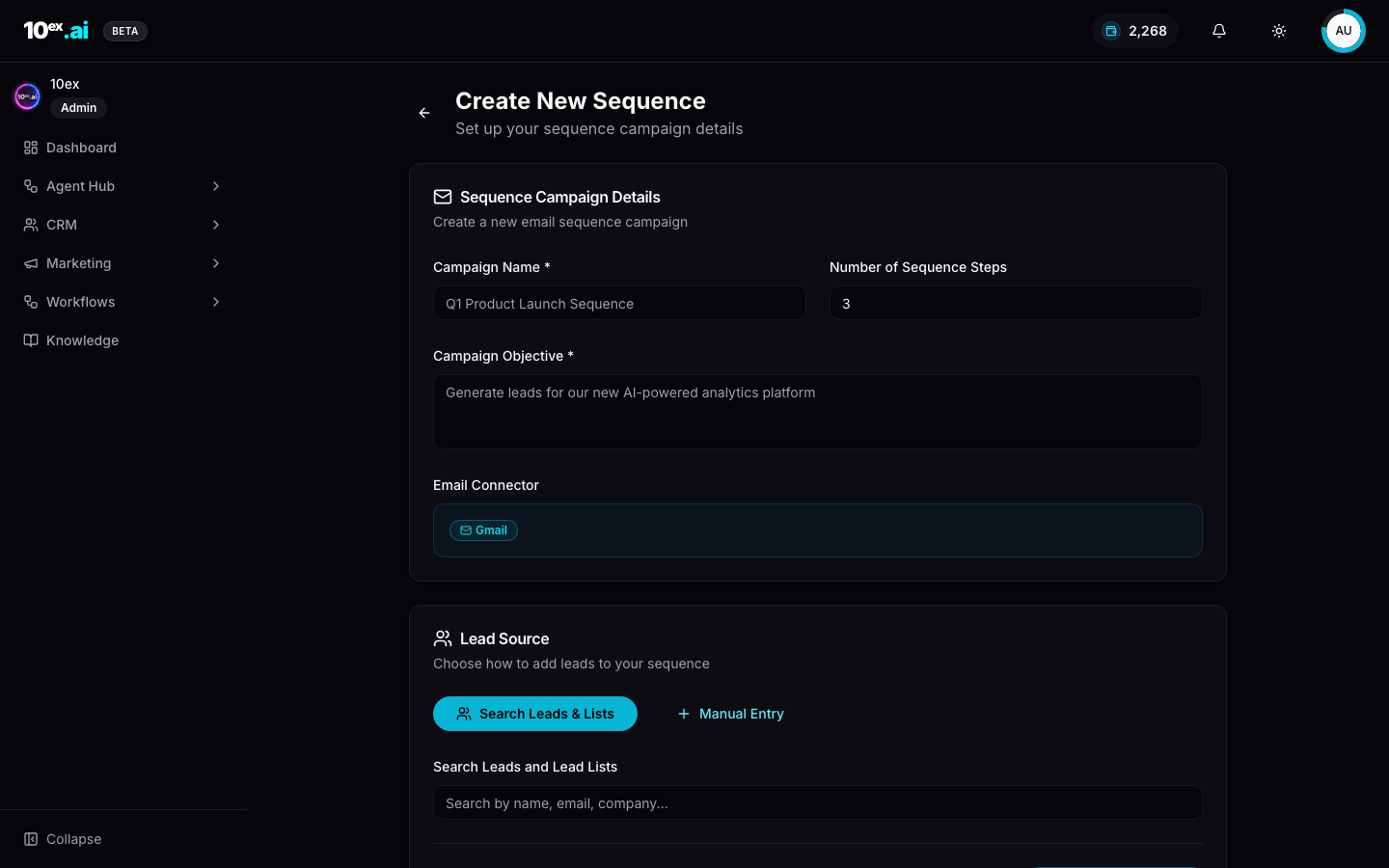
  "objective": "string, e.g. book a demo or drive trial signup",
  "sender_connector_id": "uuid, Gmail or Outlook connector",
  "num_emails": 3,
  "cadence_days": [0, 3, 7],
  "approval_required": true
}
Outputs
{
  "sequence_id": "uuid",
  "preview_url": "https://10ex.ai/marketing/sequencer/uuid",
  "recipients": 50,
  "sample_emails": [
    { "step": 1, "subject": "...", "body": "..." }
  ],
  "status": "preview" | "scheduled" | "sending" | "completed",
  "next_actions": ["approve_email_sequence", "get_email_sequence_status"]
}
Outcomes you can drive
- Net-new pipeline: turn a cold segment into booked demos in a single approval click.
- Re-engagement: wake dormant leads with last-activity-aware angles.
- Always-on nurture: wire Nova into a workflow so every form submission triggers a sequence.
MCP equivalents
preview_email_sequence({ segment_id, brand_id, objective: "book a demo", sender_connector_id, num_emails: 3, cadence_days: [0,3,7] })
approve_email_sequence({ preview_id })
get_email_sequence_status({ sequence_id }) // sent, opened, replied per recipient
Lifecycle
- Brand fetch via
knowledge_organizerandwebsite_scraper. - Lead data retrieval from CRM.
- Lead research and personalization decision.
- Write multi-email sequence.
- Review for objective alignment.
- Final edits.
- Launch via Gmail or Outlook (with approval gate).
Common questions
How does the approval gate work? After preview, Nova waits for an explicit approval call before sending. You see sample emails (typically 3 recipients) before deciding. You can reject and retry with a tweaked brief, no charge for the rejected preview.
What’s the cadence model?
cadence_days: [0, 3, 7] means email 1 today, email 2 three days later, email 3 seven days from start. Days are calendar days, not business days. Cadence respects send-window settings on the connector.
Can Nova send to international leads? Yes. Nova writes in the language detected from the lead’s domain or explicitly provided. English is the default if signals are mixed.
What happens if a lead replies mid-sequence? The sequence pauses for that lead automatically. The reply lands in your Gmail or Outlook inbox so a human can take over.
Related agents
- Orion (
email-outreach-sender): single-email cold outreach. - Marcus / Prospector (
prospector-agent): find net-new leads to fill the segment first. - Juno (
market-research-crew): sharpen ICP before personalization.
Related concepts
- The cast: Nova in context with her teammates.
- Brand knowledge schema: exactly what Nova reads.
- Approval workflows: why Nova gates by default.