Connectors
Connectors are the platform’s edges: every provider 10ex agents read from and write to. Different agents need different connectors. Without the right one, the agent’s Configure panel shows a red Connect prompt and refuses to run.
Connectors live at Settings → Integrations.
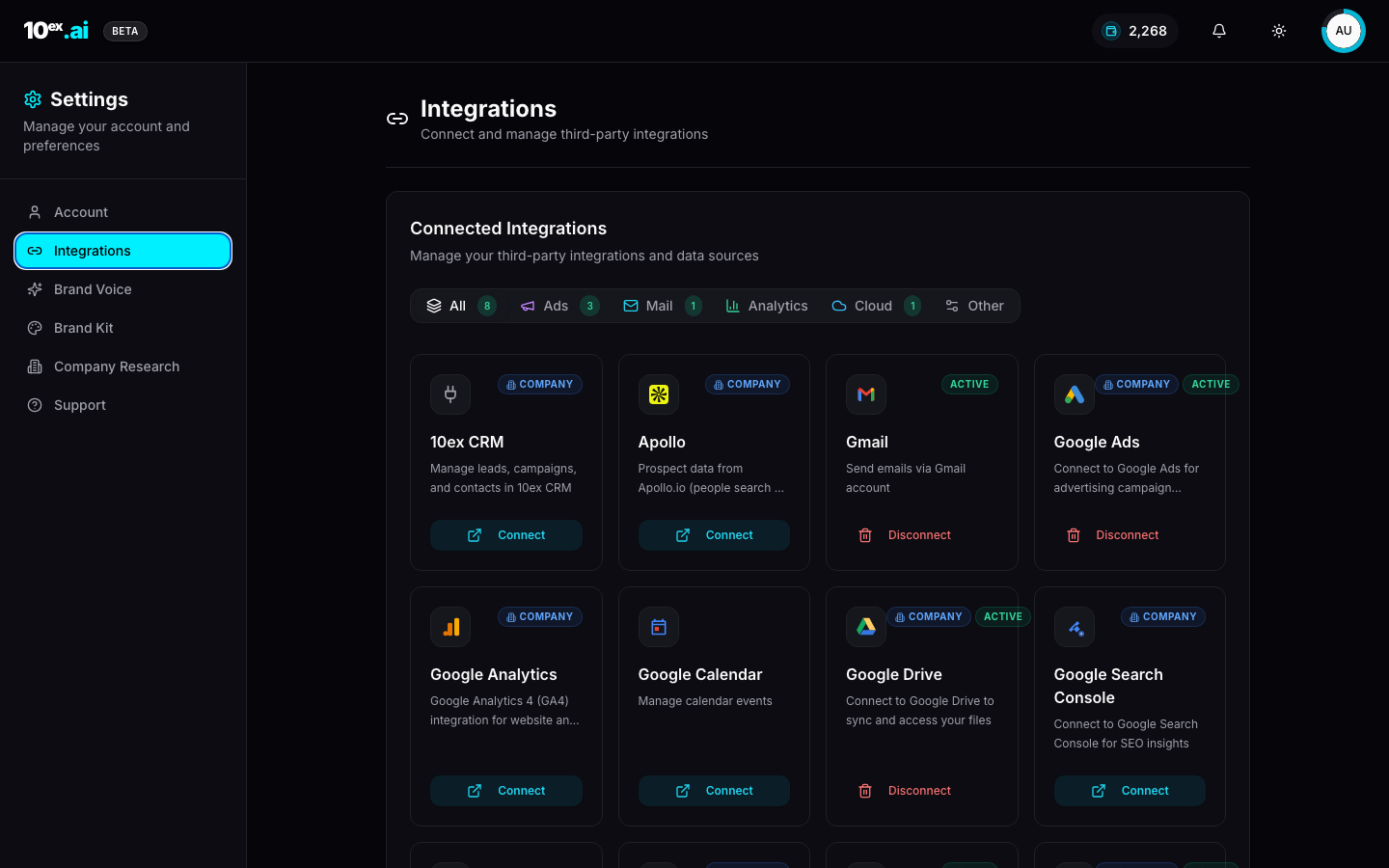
The full catalog
Tabs at the top group connectors by category. Counts reflect connected accounts, not available providers.
Email senders
| Provider | Required by | Notes |
|---|---|---|
| Gmail | Nova, Orion | OAuth, per-user account |
| Outlook | Nova, Orion | OAuth, per-user or Microsoft 365 account |
Ad platforms
| Provider | Required by | Notes |
|---|---|---|
| Google Ads | Zara, Maya | OAuth, supports multiple ad accounts (each shown as a separate row in Ads Manager) |
| LinkedIn Ads | Ravi, Maya | OAuth |
| Meta Ads | Elena, Maya | Facebook Marketing API |
Analytics
| Provider | Required by | Notes |
|---|---|---|
| Google Analytics | Dashboard, Sora, Launchpad | GA4 only. UA properties are not supported. |
| Google Search Console | Dashboard, Sora | Bundled with Google Analytics scope |
CMS / publishing
| Provider | Required by | Notes |
|---|---|---|
| Webflow CMS | Marcus/Blog | OAuth, needs CMS write permission |
| Sanity CMS | Marcus/Blog | API token plus dataset |
Cloud knowledge
| Provider | Required by | Notes |
|---|---|---|
| Google Drive | Knowledge ingest | OAuth, pick folders to sync |
| SharePoint | Knowledge ingest | Microsoft 365 |
Productivity
| Provider | Required by | Notes |
|---|---|---|
| Google Sheets | Workflows (read/write) | OAuth |
| Microsoft Excel | Workflows (read/write) | OneDrive-hosted spreadsheets |
| Google Calendar | Atlas (event invites), Kai (booking calls) | OAuth |
| Slack | Sora (audit reports), Workflows (notifications) | Per-channel scope |
| Zoom | Atlas, manual webinars | Schedule and manage Zoom webinars |
Prospecting
| Provider | Required by | Notes |
|---|---|---|
| Apollo | Marcus/Prospector | Managed by 10ex. Uses platform credentials. No OAuth required, no user setup. |
| Internal CRM | Marcus/Prospector, every CRM-writing agent | Always available. The 10ex-native CRM. |
CRM sync
| Provider | Required by | Notes |
|---|---|---|
| HubSpot | CRM sync (bidirectional) | OAuth |
| Salesforce | CRM sync (bidirectional) | OAuth |
| 10ex CRM | Native, every agent | The target for bulk_import_leads and similar calls |
Connection states
Every tile shows one of three states:
- Active: the connector is wired and authenticated. Agents that need it run without prompting.
- (no badge): not connected. Agents that need it surface a red Connect prompt.
- Company: the connection is workspace-scoped (visible to all admins) rather than user-scoped.
Disconnect is destructive. It revokes the OAuth grant and breaks any in-flight runs. Re-connecting is one OAuth round-trip.
Connector requirements per agent
The Profile drawer’s Connector Requirements widget tracks which connectors are needed for which agents. A multi-channel motion typically wants 12 providers out of the box: Gmail, Google Ads, Google Analytics, Google Drive, LinkedIn Ads, Meta Ads, Outlook, Sanity CMS, Webflow CMS, SharePoint, Slack, Zoom.
Connecting all of them up front is overkill. The Launchpad sequences connector connection alongside agent hires. Only connect what the next phase of the plan needs.
Platform-managed connectors
Two connectors are different. They require no user setup.
- Apollo: 10ex provides the API key. You pay for usage as part of Marcus/Prospector’s per-run credit cost.
- Internal CRM: always wired. It’s the 10ex CRM itself.
Connector tiles for these show “Managed by 10ex. Uses platform credentials, no user setup required.”
How to connect Gmail (OAuth flow)
For OAuth-based connectors:
- Click Connect on the tile.
- The browser opens the provider’s OAuth consent screen.
- Approve the scopes. 10ex requests minimum scope per provider.
- You land back on Settings → Integrations and the tile flips to Active.
For programmatic flows, see the MCP equivalents below.
A real example: connecting Gmail for Nova so it can send a sequence as you. Click Connect on the Gmail tile, sign in with the Google account whose inbox you want Nova to send from, approve the scopes (gmail.send, userinfo.email), and you’ll be redirected back. Nova’s Configure panel will now show Gmail as green.
BYOK (bring your own key)
For some agents (typically Apollo and OpenAI) you can swap the bundled provider key for your own. This skips the bundled data fee in exchange for managing your own quotas. Configure it per-connector under the tile’s settings menu. See Concepts → Connectors / BYOK.
MCP equivalents
list_connectors() // every provider with current status
start_connector_oauth({ provider: "gmail" }) // returns authorization URL
get_connector_status({ provider: "gmail" }) // poll until "active"
The OAuth URL has to be opened by a human. There is no agent-only path through provider OAuth.
Common questions
My connector says Active but the agent still can’t run. Likely a scope issue. Disconnect, reconnect, and approve all requested scopes this time. Some users uncheck a scope on the consent screen and lose write permission.
Can two teammates both connect Gmail? Yes. Connectors are per-user by default unless explicitly workspace-scoped (the Company badge).
What happens when an OAuth token expires? We refresh it automatically using the refresh token. If the refresh fails (account deleted, password changed), the tile flips out of Active and agents stop until you reconnect.
Related
- Brand knowledge: cloud connectors as the source for the knowledge layer
- Cast: named agents: which persona needs which connector
- Quickstart: the Gmail-only fastest path