Knowledge
The Knowledge layer is what stops 10ex agents from sounding generic. The first sub-agent in most crews calls knowledge_organizer and reads a project-specific subset of your knowledge before doing anything else. Get this wrong and Marcus writes blogs that could be from any company. Get it right and every persona sounds like you.
This guide covers the Knowledge Base surface at /knowledge. For the underlying schema (Company, ICP, Brand Voice, Brand Kit), see Brand knowledge schema. For the runtime model, see Knowledge & RAG.
What goes in
Three categories of input, all converging on the same Qdrant index per workspace:
| Category | Examples | Surfaces |
|---|---|---|
| Brand context | Company overview, USPs, ICP, brand voice, logos, colors | Settings → Company Research / Brand Voice / Brand Kit |
| Documents | PDFs, web pages, transcripts, case studies, sales decks | Knowledge → Upload Document |
| Cloud sources | Google Drive folders, SharePoint sites | Knowledge → Connect Company Knowledge |
Past agent outputs (successful blogs, ads, email sequences) are also indexed automatically as few-shot retrieval examples. You don’t need to upload those manually.
The Knowledge Base view
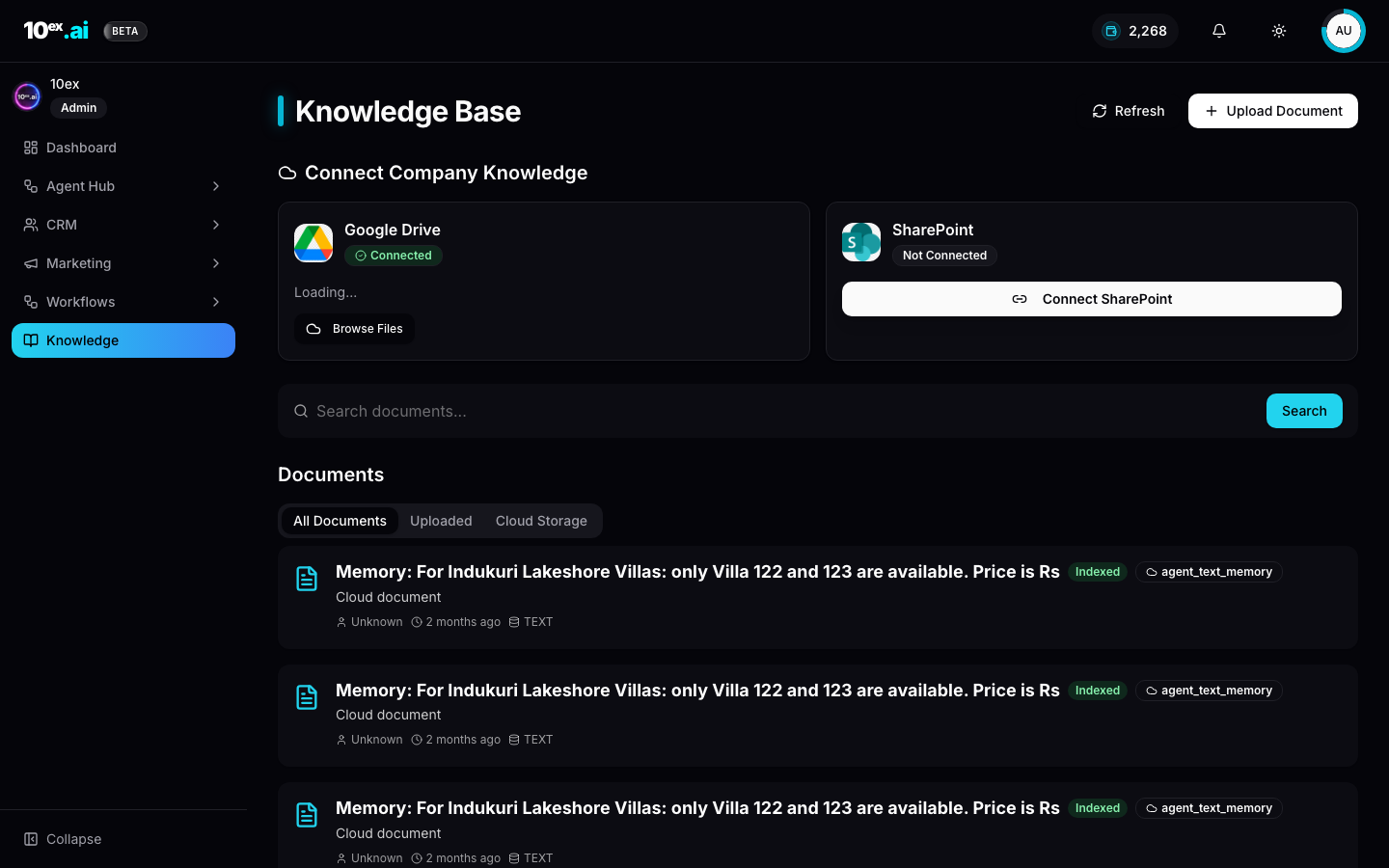
The page has three regions:
- Connect Company Knowledge at the top. Cloud sources (Google Drive, SharePoint) and Direct Upload. Each shows connection state.
- Search documents: full-text search across the indexed corpus.
- Documents: three tabs (All Documents, Uploaded for direct upload, Cloud Storage for Drive plus SharePoint). Each row shows the indexing status (
Indexedonce embedding is complete,Pendingwhile in flight) and source type (TXT,PDF,Cloud document).
How to ingest knowledge: three ways
1. Direct upload
Click Knowledge → Upload Document. Supports PDF, DOCX, TXT, MD. Files are parsed, chunked at roughly 400 tokens with 50 overlap, embedded, and indexed. The row’s badge flips from Pending to Indexed when the embedding job completes, usually 10 to 30 seconds per document.
2. Cloud sources
Open Knowledge → Connect Company Knowledge → Google Drive | SharePoint. Once connected, Browse Files opens a picker scoped to your Drive or SharePoint and lets you select folders to sync. The connector watches for changes. New files appear automatically, and edits re-trigger embedding.
This is the fastest path for teams that already have brand assets organised in Drive. Point the connector at your /Marketing folder and you’re done.
3. URL ingestion
For external pages and competitor research, call ingest_url_into_knowledge over MCP, or paste URL in the upload dialog. 10ex scrapes the page, strips boilerplate, and indexes the content as a Cloud document with the URL as the source.
This is what auto-fills your brand kit when you click Import Brand Kit under Settings. Under the hood it’s a URL ingest pointed at your domain.
How retrieval works at runtime
Every agent that reads knowledge calls knowledge_organizer with a project key, e.g. brand_voice, case_studies, or competitor_analysis. The tool projects only the slice of the index relevant to that key. Marcus/Blog doesn’t see your brand kit logos, and Iris doesn’t see your case studies.
Cross-cutting tools like qdrant_search are also available for free-form retrieval inside agents. Same backend, less structured access.
Re-indexing
Documents are re-embedded automatically on:
- File edit (cloud sources)
- Brand schema update. A Settings save triggers a refresh of derived chunks.
- Manual Refresh button on the Knowledge page.
Manual refresh is rare. It’s only useful if a document seems missing from agent output despite being indexed.
MCP equivalents
list_brand_knowledge() // returns the structured brand schema
upsert_brand_knowledge({ offerings, usps, buyer_personas })
ingest_url_into_knowledge({ url: "https://yourcompany.com/about" })
search_docs({ query: "competitor differentiation", k: 5 })
Common questions
A document is stuck on Pending. Most often a parsing failure. PDFs with scanned images or DRM won’t index. Re-upload as text or run OCR first.
Can I delete a chunk without deleting the whole document? No. Re-upload an edited version or remove the source file.
How do I keep brand voice consistent if multiple teammates upload different style guides? Use the structured Brand Voice settings as the source of truth. Documents add detail, but the structured schema wins on conflict.
Related
- Brand knowledge schema: what Marcus, Nova, and Maya read
- Knowledge & RAG: the Qdrant runtime
- Connectors: Google Drive and SharePoint as knowledge sources